
This post may contain affiliate links, meaning I may receive a commission if you purchase through my links. I only recommend products I have personally tested or have thoroughly researched. All opinions are my own. Please read the full disclosure for more information.
If you’re a blogger, influencer, affiliate marketer, online coach, or just someone looking to increase their Pinterest traffic, then you’ve probably struggled with this for a while. I know when I first started working with Pinterest for my blog I thought I knew enough to do pretty well with it.
But, as it turns out, there is so much more to Pinterest than meets the eye. It isn’t just about having pretty images and a few keywords you throw together. There are things that you don’t think about until you notice your traffic is coming in at a turtle’s pace.
As it turns out, I had to learn some of these things the hard way. But, when I finally learned what these tricks were, my traffic finally started coming in and it reached over 2400% from where I started.
Here’s what it took for me to increase my traffic by over 24x.
Take a Few Pinterest Courses
You’ve probably already considered taking a course or two to improve your Pinterest traffic. As a beginner, or someone who just doesn’t quite fully understand how Pinterest works, digital courses taught by those who have figured it out can really give you a leg up.
Yes, most of this information is available somewhere online. But, it isn’t organized in a way that you can implement it, or even understand it. And it may take months or even years to learn or discover all of those helpful tricks.
Instead, when you sign up for an online course, you can follow step-by-step to improve where you struggle most. I know that this little bit of investment is worth every penny because of the time and effort it saves.
Here are a few of the courses I’ve taken.
- Pinteresting Strategies
- The Golden Compass to Pinterest Traffic
- Pinterest Rank 2.0
- Pin Like a Pro (get 50% off using my link)
Pinteresting Strategies
This course is taught by Carly Campbell who has been a mommy blogger since 2016. From there she grew significant traffic to her blog, almost entirely from Pinterest. Within 9 months of starting her blog she was making a full-time income, and eventually well over $10,000 a month from her blog.
And, in late 2024 she actually started a Pinterest Podcast as well to even better serve other Pinterest users.
You can join Pinteresting Strategies here.
I took her course back in February of 2024, and didn’t start implementing those strategies until late April. And about 5-9 months later, I started seeing significant traffic coming into my blog.
For over a year before this, I struggled to get any traffic to my blog. I had considered giving up because I wasn’t sure I had what it took. Turns out, I just wasn’t using the right strategies.
This course helped me increase my traffic by more than 24x where I started in February. And, it still helps me with increasing my traffic.
What I love most about her course, is that it is surprisingly affordable. I wish I had bought it sooner because I could have been making money so much sooner too.
If you need to increase your traffic from Pinterest, this course will help you accomplish that.

Related: Honest Review of Pinteresting Strategies by Carly – 2025
The Golden Compass to Pinterest Traffic
This course was created by Ling, a blogger with a personal finance and lifestyle blog. You have probably seen some of her pins on Pinterest if you’ve ever searched for anything related to personal finance. This is because she 100% knows what she is doing on Pinterest.
Anytime I have done a search for anything remotely related to personal finance – making money, side hustles, saving money – I have seen at least one or more of her pins ranking in the top results.
And, after starting her eBook and implementing just a few of her tips, I started seeing my own pins ranking higher in search results. This was even before I finished the book.
Her pin designs are very chic and click-worthy. Every time I do a Pinterest search, I see high-ranking pins that have her design style. So, she clearly has an eye for good design, and a good knowledge of keyword research.
You can grab her eBook here (with two other awesome bonuses) to get started and improve your own Pinterest traffic results. You can also get a bunch of her beautiful template designs as well.


Free Tricks and Strategies to Improve Pinterest Traffic
While I would love for everyone to take the same few courses I’ve taken to get the same or better results that I have, I understand that money can be tight. It’s important to know that you will have to invest in your business to make money.
But, sometimes this just isn’t an option. So, here are a few of the tips that I’ve used to help my own process.
Batch Create Pins
Every time I write a new blog post I usually create a bunch of pins as well. While some bloggers only suggest creating 20-30 new pins for every blog post, I usually end up making around 100 or more.
This isn’t to scare you into creating that same amount. It isn’t a necessary number to have success. I have just found that if I spend around an hour or so, including keyword research, I can usually create around 100 pins using just a few templates.
My process simply involves editing and customizing around 10 templates (new text, colors, etc.), and then swapping out a few things along the way.
Related: 8 Simple Ways to Save Time and Money Creating Pinterest Pins on Canva
Use the Native Pinterest Scheduler (it’s FREE!)
Many other bloggers use Tailwind, and while I had it for a while, I only actively used it for a month before I stopped using it. I honestly partly forgot about it.
However, after getting tired of using the native scheduler, since you have to reschedule every 2-4 weeks, I decided to give Tailwind another try, and I CANNOT go back to not having it. I’ll get into this more in a second.
While the Pinterest native scheduler is very easy to use, there are some downsides to only using this method. But for the most part, I didn’t have too many issues.
Pros:
- You can batch-edit Pinterest pins (titles, descriptions, boards, dates, tags, etc.)
- You can keep pins in the editor to publish/schedule later (only up to 30 days before it expires)
Cons:
- You can only schedule pins for up to 30 days at a time
- You can only upload 10 pins at a time (but keep as many in the scheduler as you want)
Use the Tailwind Scheduler
In the past I’ve haven’t always been so in love with Tailwind. I used to think it was one of those things that was kind of overrated, yet somehow everyone still loved it.
But, after spending several months only using the Pinterest native scheduler, I quickly changed my mind.
I went ahead and signed up for the lowest plan option, which gives you 200 posts per month, or about 6 pins per day. The great thing that really makes Tailwind stand out is that you can schedule pins out years in advance, if you really wanted to. And, I have.
Additionally, you can upload up to 100 pins at a time, and see them all in the same space, so you can just copy and paste your titles and descriptions from your list.
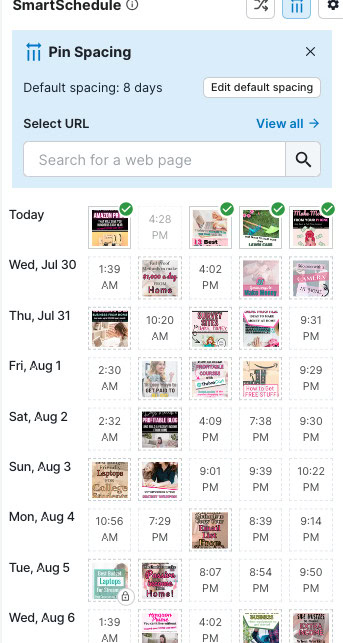
What’s even better is that they recently, in mid-2025, added a feature where you can set up pin spacing, so when you select “all pins” to schedule, it will space your pins out by the amount you set.
So for me, with pins that share the same URL, I like to schedule these at least 8 days apart. And, now I can do that in bulk without having to manually set this up myself. So now, I can’t really go back to the ‘ancient way’ of doing things. Lol.
I cannot recommend it enough, but I highly recommend getting Tailwind and using it as part of your Pinterest strategy. Because it saves you so much time, it is also saving you a lot more money in the long run. But, if you’re not sure if its for you, you can get started for free and upgrade when you’re ready.
Batch Schedule Pins
No matter what scheduler you use, you should be able to schedule around a month’s worth of pins in advance. If you use the native Pinterest scheduler, you can only upload 10 new pins at a time before you can add more.
However, you can schedule as many pins within that 30-day timeframe as you want. You can schedule 30, or you can schedule 300.
When you do this with Pinterest you can select the “edit all” option, or edit multiple pins at a time. This allows you to update the website link, boards, titles, descriptions, and more all at the same time.
Tailwind allows you to ‘bulk edit’ as well, so this is a good feature that carries over.
However, you want to make sure that your titles and descriptions are all unique. So these should be done one at a time.
Use A.I. to Save Time Writing
I know that not everyone likes using A.I., and I was on the fence for such a long time about this too. But, considering where the online space is at today, it has become a necessity to keep up with your competitors.
I won’t write an entire blog post using A.I., and I mostly use it to create outlines or help me clarify something I’m trying to say (as I am often a bit wordy). But, for purposes like writing Pinterest descriptions and coming up with titles, it has saved me dozens of hours already.
What used to take me nearly an hour just to come up with ideas for around 20 Pinterest titles and descriptions, now only takes about 5 minutes. It takes me longer to assign boards and schedule dates for my pins.
I suggest you write a few templates for your descriptions, leaving a few blanks where keywords will fill in the space, and then inserting a group of the most relevant keywords. ChatGPT will do the rest for you. All you have to do is copy and paste.
If you want to learn the exact step-by-step strategies I use, you can sign up for my course and use this link to get 50% off.

Final Thoughts on Increasing Traffic from Pinterest
Pinterest is an amazing tool for all kinds of content creators, entrepreneurs, and online business owners to get traffic to their sites and make sales. While not all niches work the best on Pinterest, many do, and for the ones that do, it is important to upgrade and update your strategies as needed to make sure you are getting the most traffic for your efforts.
With digital courses like Pinteresting Strategies, and the Golden Compass to Pinterest Traffic, I have saved hundreds of hours of internet research. I have also avoided all the mistakes that could have cost me traffic and income.
For many bloggers, Pinterest is one of their biggest sources of organic traffic. So, if you’re looking to find better ways to improve on this, the tips and resources I included in this post will help you tremendously.
They certainly helped me grow mine by over 2400%.
Related Articles
- 14 Ways to Skyrocket Your Blog Traffic on Pinterest in 2025
- 8 Simple Ways to Save Time and Money Creating Pinterest Pins on Canva
- Honest Review of Pinteresting Strategies by Carly – 2025
- How to Start a Profitable Blog and Make Money in 2025
- 15 Expert Strategies to Build an Email List in 2025
